
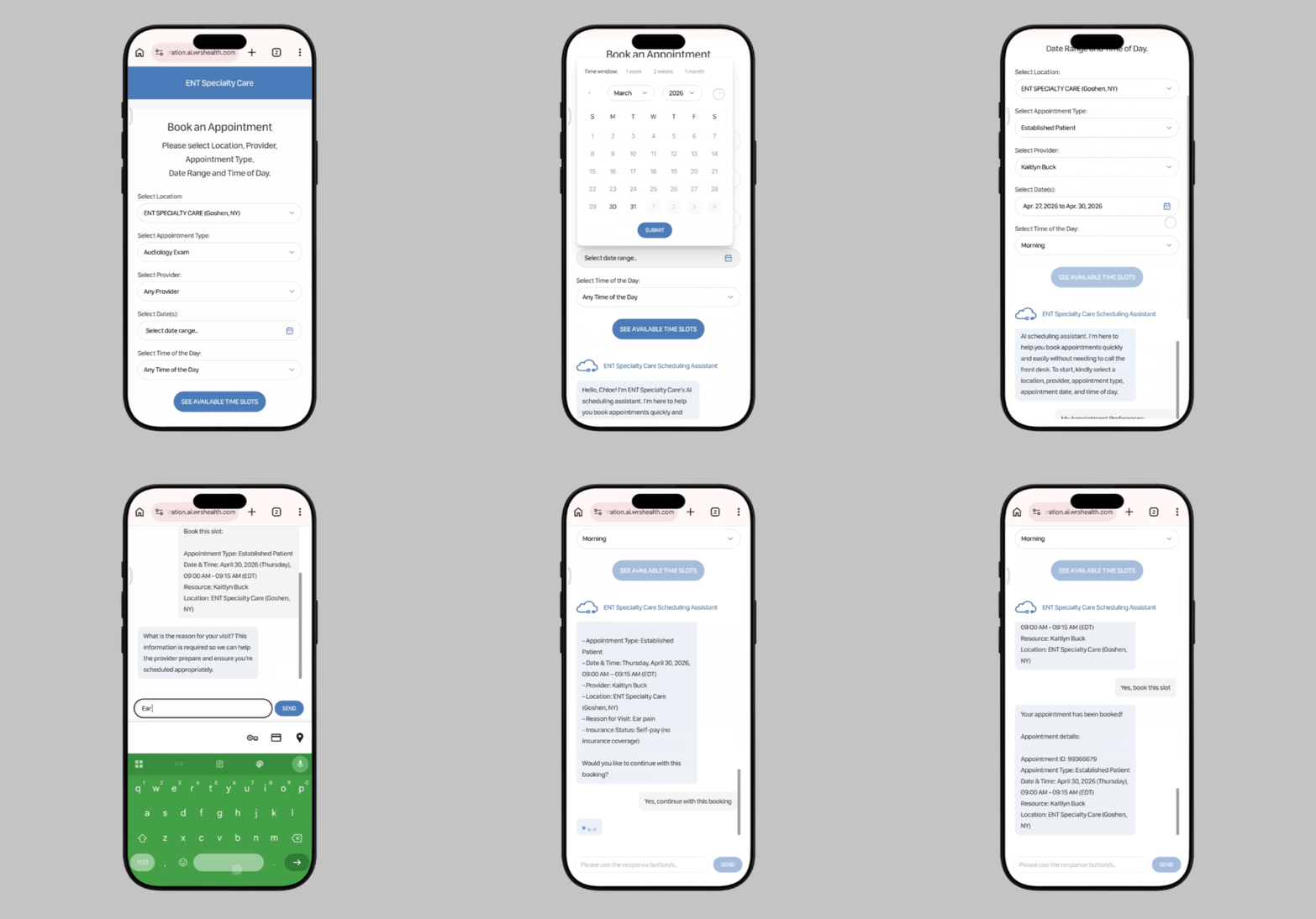
Scheduling shouldn’t depend on phone tag, guessing games, or staff availability. When patients book their own appointments, the system applies your rules automatically so every visit is placed correctly from the start.
Patients choose appointments online through a guided experience based on their needs.
Provider availability, appointment types, locations, and insurance requirements are enforced behind the scenes.
Booking happens independently, reducing inbound calls and manual scheduling work.
The system filters out incorrect combinations so patients can’t select the wrong provider, visit type, or time.
Explore how our Patient Self-Scheduling Agent functions with the demo below:
Scheduling works best when the system understands who the patient is, what they need, and how your practice operates.
As patients move through the booking process, the Patient Self-Scheduling Agent gathers key details—such as visit intent, patient status, and insurance information—and uses that context to guide each step. Instead of showing every available option, the system narrows choices in real time based on what makes sense for that specific patient and visit.
This ensures appointments are not just available, but appropriate and viable.
The system uses patient details and visit intent to guide selection of the right provider, location, and appointment type.
Insurance information is considered during booking, helping ensure patients only schedule visits that align with their coverage.
Information gathered during scheduling flows into the patient record, supporting registration, documentation, and billing workflows that follow.
While our Patient Self-Scheduling Agent improves access and convenience, its biggest impact is reducing incorrect bookings that lead to reschedules, delays, and frustration. Let’s look at how our AI-powered solution differs from other tools on the market.

Caroline goes online to book an appointment.
She sees a list of open time slots and a few appointment types, but little guidance on what to choose. She selects a time that works for her and picks what seems like the right option.
Behind the scenes, the appointment may not align with the provider’s scope, the visit type may be incorrect, or her insurance may not be accepted for that service.
The appointment gets booked—but not necessarily correctly.
Now staff need to review the schedule, follow up with Caroline, and potentially reschedule the visit.

Caroline starts the booking process online.
Instead of showing every open slot, the system guides her step-by-step. It applies provider, location, appointment type, and insurance rules in real time.
As Caroline moves through the process, only valid options are shown. Incorrect combinations are filtered out automatically. And if her insurance isn’t accepted? Our agent lets her know early.
When she confirms the appointment, it already meets the practice’s requirements.
No surprises. No follow-up corrections. No front desk intervention. The appointment is right the first time.
Find out how the Self-Scheduling agent can make an
impact to your practice.
Most scheduling tools simply display open time slots and rely on patients or staff to choose the correct option.
The Patient Self-Scheduling Agent actively guides the booking process. It applies your practice’s rules in real time, filters out invalid options, and ensures each appointment meets provider, location, and insurance requirements before it’s confirmed.
Patients are only shown options that match your configured rules. The system removes incorrect combinations automatically, so invalid bookings never appear as choices.
Instead of relying on manual decision-making, the system evaluates every booking against your rules. This eliminates common issues like incorrect visit types, wrong providers, or mismatched insurance.
Yes. Patients can schedule appointments on their own, which reduces call volume and frees staff to focus on higher-value tasks.
Yes. You define the rules. Provider availability, appointment types, location filters, insurance requirements, and booking restrictions can all be configured to match your workflows.
Insurance requirements are checked during the booking process. This helps prevent patients from scheduling appointments that don’t align with their coverage.
Patients are guided step-by-step through the process, but staff can always assist or manage appointments when needed.
No. The system identifies existing patients using demographic and historical data and matches records automatically. New patient workflows are only triggered when necessary.
Yes. All data is handled through secure, HIPAA-compliant workflows within the platform.
Scheduling sets the foundation for the visit. Once the appointment is booked correctly, downstream workflows—registration, documentation, and billing—can proceed with fewer corrections and delays.